LetsVPN Review 2026
Designed primarily for bypassing China's Great Firewall, LetsVPN delivers reliable connections in restrictive regions but raises serious privacy concerns with its opaque ownership and proprietary protocols.
LetsVPN is a budget-focused VPN built specifically for China, but you're trading transparency for access.

- Table of Contents
- LetsVPN Review Overview
- LetsVPN: Latest News & Updates
- LetsVPN Background & History
- LetsVPN Features
- LetsVPN Cost: Plans & Value for Money
- Apps & Support
- Server Locations
- Hands-On Testing & Ease of Use
- Speeds & Performance Testing
- Streaming Performance
- Security: Is LetsVPN Safe
- Is LetsVPN Private?
- Customer Support
- LetsVPN Reviews on Reddit & Social Media
- Does LetsVPN Work in China?
- Bottom Line: Do I Recommend LetsVPN?
- LetsVPN Alternatives
- FAQ: LetsVPN Review

Quick Summary: LetsVPN Review
LetsVPN excels in China, with Platinum mode improving connection reliability on heavily filtered networks. However, the lack of company ownership transparency and proprietary protocols that can’t be independently verified make it a hard sell for privacy-conscious users. However, you can try LetsVPN from $2.99 for a week-long subscription.
LetsVPN is a tool made just for expats and travelers who want to get around censorship in places like China. If you’re looking for a LetsVPN review, you probably heard about it in a Reddit thread about which VPNs really work behind the Great Firewall and are planning a trip to the mainland.
LetsVPN excels at one thing: connecting you online in China when many other VPNs struggle. However, that reliability has a significant downside. The service lacks transparency regarding its operators, location and the functionality of its proprietary connection methods. No independent security audits exist, and there’s minimal public documentation regarding its infrastructure.
So while LetsVPN could be among the most dependable options for circumventing censorship in China, it demands a level of trust that many privacy-conscious VPN users might find unsettling.
If absolute privacy is your priority, you’ll want to explore our comprehensive best VPN guide instead. LetsVPN is a tool for accessing blocked websites, not for protecting dissidents.
LetsVPN Review Overview
- Affordable pricing
- Actually works in China
- Stable connections in restrictive environments
- No kill switch
- Vague privacy policy
- No third-party security checks
- Poor at unblocking streaming services
- Hard to find any information about it at all
- Lacks transparency about company ownership
- Proprietary protocols can’t be independently audited








LetsVPN is a tool made just for expats and travelers who want to get around censorship in places like China. It works like a typical VPN, but it’s better at getting around deep internet censorship and network blocks than most services. This lets people use websites and apps from around the world that are usually blocked on heavily filtered networks.
LetsVPN appears to be connected to a service called LetsGo Network, though the company does not publicly confirm its ownership or development team. Its main selling point is that it works well in places with a lot of censorship, rather than offering traditional VPN features like big server networks or advanced customization.
How Good Is LetsVPN?
It’s difficult to review LetsVPN because it only does one thing well, so it feels like judging a swiss army knife by how well it works as a screwdriver. LetsVPN gets an A+ if your only question is, “Will this let me check Gmail from Shanghai?” For just about anything else a VPN should do, it ranges from bad to genuinely concerning.
The service appears to have emerged in the early 2020s, although no official launch date has been disclosed. The fact that it’s worked all that time is pretty impressive in the China VPN market. Most services get blocked, stop working, or disappear within a few months.
The fact that LetsVPN continues to work within China prompts inquiries about how it manages to operate in such a restrictive setting while other VPNs struggle. In other restrictive countries, such as Russia, authorities have mandated that VPN providers log user data or provide server access, leading many to exit instead of complying.
In this context, LetsVPN’s availability could indicate a possible level of government tolerance or cooperation. That’s worrisome, particularly given the lack of transparency regarding its encryption and data management, which makes it difficult to evaluate just how private it keeps your data.
LetsVPN: Latest News & Updates
As of March 2026, LetsVPN continues to function reliably in mainland China. Reddit users and expats often mention that the service stays reliable, even during politically sensitive times when VPN disruptions can rise.
The company occasionally releases app updates, but the changelogs tend to be brief, often mentioning only general improvements like “connection stability.”
LetsVPN offers apps for Windows, macOS, iOS, and Android. Linux support remains uncertain, with many reviews and community discussions highlighting the absence of an official Linux client in the past.
LetsVPN Background & History
LetsVPN is a specialized VPN service that lets people get around China’s internet restrictions. Instead of competing with mainstream VPNs on privacy features or large server networks, LetsVPN appears to rely on proprietary connection methods that likely include traffic obfuscation to bypass network filtering.
LetsVPN is popular with travelers and expats who need to be able to access blocked websites and apps all the time because it has such a narrow focus.
What Is LetsVPN?
LetsVPN is a virtual private network service that specializes in circumventing internet censorship in restrictive countries, particularly China.
LetsVPN says it uses proprietary connection methods designed to keep VPN traffic working on heavily restricted networks. This is why it works when other services that use standard OpenVPN or WireGuard implementations get blocked right away.
Who Owns LetsVPN?
This is when things start to get uncomfortable. LetsVPN doesn’t give much information about who runs or owns the service. The site says that “LetsVPN Team” is the operator, but it doesn’t say what company it is, where it is registered, or who the executives are.
This level of secrecy is very worrying for a service that promises to help you avoid government spying. The top VPNs take a different approach; they openly disclose ownership, provide verifiable privacy policies, and limit user data collection through no-logs policies, encryption and independent audits or open-source applications.
In contrast, LetsVPN requires a significant amount of trust but provides minimal accountability, raising concerns for a service that is supposed to shield you from government surveillance.
Where Is LetsVPN Located?
LetsVPN doesn’t say where its headquarters or jurisdiction is. There is no business address in the terms of service, and the privacy policy doesn’t say which country’s laws apply to data handling.
Some people on Reddit think that LetsVPN might be based in China, but I couldn’t find any solid proof of this. What I found was a lot of nothing, which is worse than bad news for a privacy tool.
Is LetsVPN Safe?
LetsVPN is probably safe, if you mean “will it encrypt my connection and keep my ISP from seeing my traffic?” But overall, you can’t trust this service with private information or use it to protect you with online political activism.
LetsVPN claims to use unique connection methods aimed at evading detection by network filtering systems, but the company keeps the technical details of these protocols under wraps. The privacy policy provides limited information on data collection practices. No third-party security checks have been conducted on the VPN infrastructure or logging methods.
It should be fine to use Netflix in China or check your email while you’re on the go. If you need real privacy protection, look at our best VPN for China guide.
LetsVPN Features
LetsVPN is very simple. It focuses almost entirely on keeping connections stable on networks that are restrictive, rather than giving you many advanced VPN tools. Some of its main features are:
- Designed for restricted networks: Uses proprietary connection methods intended to keep VPN connections working on heavily filtered networks like those in China.
- Automatic server selection: The app usually picks the best server automatically, which means you don’t have to do much manual setup.
- Minimalist interface: Made for one-tap connections, which makes it simple for travelers and expats who just want to get to blocked services quickly.
- Encrypted connections: The service encrypts your traffic, though the company does not publish technical details about the encryption used.
- Limited simultaneous connections: Depending on the subscription level, it usually only lets a few devices connect at once.
Many features that are common in mainstream VPNs — like ad blocking, multi-hop routing, dedicated IP addresses, and a lot of configuration options — are missing.
How Does Split Tunneling Work on LetsVPN?
LetsVPN does not support split tunneling through apps. Instead, it has two connection modes that decide how traffic moves through the VPN.
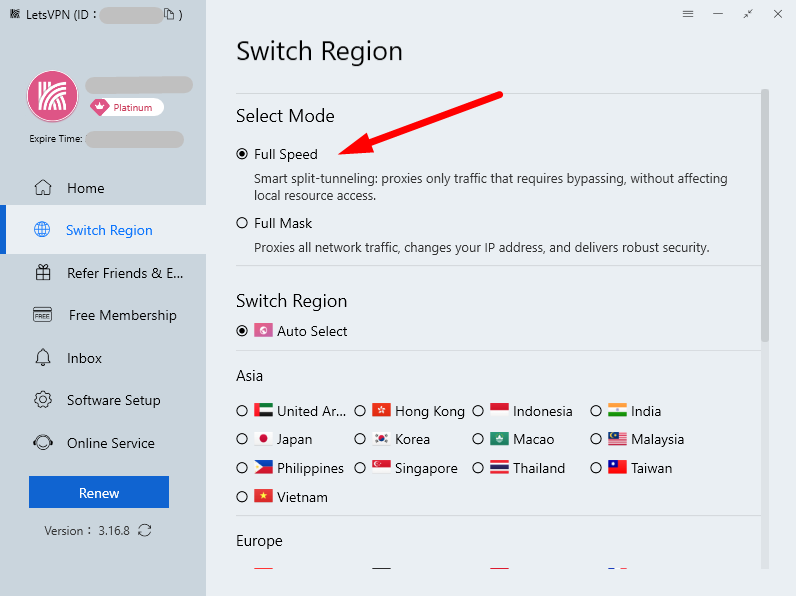
The app calls it “smart split tunneling,” which means that only traffic that needs to get around censorship goes through the VPN. All other traffic, like local or unrestricted traffic, goes through your regular internet connection. This helps keep speeds up and stops things from getting in the way of local services.
Full Mask mode, on the other hand, sends all internet traffic through the VPN, changing your IP address and encrypting every connection for the best coverage. However, this can slow down your connection a little.
Does LetsVPN Have a No-Logs Guarantee?
LetsVPN claims it does not log browsing activity or gather personally identifiable information. Nonetheless, LetsVPN’s privacy policy still raises concerns as it permits users to upload device IDs, purchase details, support materials, interaction data, and diagnostic logs during troubleshooting.
The company offers minimal information regarding its overall infrastructure or independent verification. Without an independent audit to confirm these claims, users have to depend on the provider’s statements about their logging practices.
The potential risks, particularly in a tightly controlled environment like China, create challenges in trusting those assurances due to a lack of transparency. I suggest approaching these claims with a healthy dose of skepticism.
What Is the Difference Between Standard and Platinum Connection Modes?
LetsVPN doesn’t offer different connection modes by default. Instead, it separates features through two subscription tiers: Standard and Platinum.
The Standard plan connects you to the fastest server automatically and lets you use apps and websites that are blocked. However, you can’t control how traffic is routed. The Platinum plan gives you access to more features, the most important of which is the ability to switch between Full Speed and Full Mask modes.
LetsVPN Cost: Plans & Value for Money
LetsVPN claims to be the cheap way to get around China’s Great Firewall, and their prices show that they are serious about keeping costs low. There are no fancy tier names or clever marketing for premium VPNs here. Just simple plans with simple limits.
Breaking Down LetsVPN Pricing & Plans
You can choose from weekly, monthly, three-month, or yearly plans, and the cost will depend on whether you choose the Standard or Platinum tier. Longer subscriptions come with small discounts, but not the big ones that services like Surfshark or NordVPN offer.
| Plan Duration: | Standard Mode | Platinum Mode |
|---|---|---|
| 1 Week | $1.99 | $2.99 |
| 1 Month | $4.69 | $6.69 |
| 3 Months | $10.99 | $15.49 |
| 1 Year | $39.99 | $53.99 |
The prices are really competitive for VPNs that work in China. Astrill and other similar services charge $30 a month for the same features. But when you compare LetsVPN to full-featured VPNs like Proton VPN or Surfshark (which sometimes work in China), it’s not as clear what the value is.
You’re getting a lot less for your money: no money-back guarantee, only two connections at once, limited streaming support, and no clear information about who runs the service.
How to Get LetsVPN for Free
LetsVPN says you can get a 72-hour free trial, but I don’t think it actually exists. Customer support states that getting a friend to sign up for a plan means you get extra time (which is true), but I’m pretty sure the free trial is just a way to get you to download the app.
You can snag some free time by trying the “Free Membership” lucky dip; every hour, you can click a button in the app for a chance to win some extra connection time. I haven’t won anything (yet!), but you might.
Apps & Support
It seems like the engineers who made LetsVPN’s apps have never met a UX designer and don’t want to. Everything works, and nothing is broken, but nothing is really fun to use either.
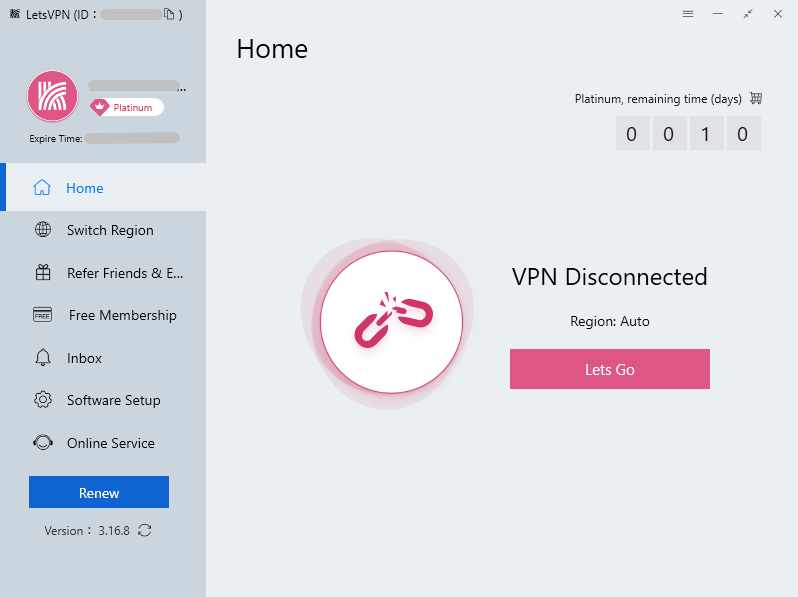
LetsVPN also showed me one of the strangest account systems I’ve seen in a VPN: you could lose the rest of your subscription time if you log out on all of your devices. You need to contact customer service and ask them to manually restore the time to get it back.
It’s a strange design choice that makes things harder for users and could easily make people think their plan has expired when it hasn’t, whether they mean to or not.
What Devices Work With LetsVPN?
LetsVPN works on the following platforms:
- Desktop: Windows, macOS
- Mobile: iOS, Android
- Browser extensions: None
- Smart TVs (smart DNS only): None
- Routers: None
Server Locations
The server network is not very big, and it focuses mostly on Asia and important Western places like the U.S. When you’re trying to figure out if LetsVPN has coverage in the countries you need, it’s annoying that they don’t publish exact server counts.
Where Are LetsVPN Servers Located?
| Region: | Countries | Locations |
|---|---|---|
| Asia | 14 | UAE, Hong Kong, Indonesia, India, Japan, Korea, Macao, Malaysia, Philippines, Singapore, Thailand, Taiwan, Vietnam |
| Europe | 13 | Switzerland, Germany, Spain, France, Ireland, Italy, Netherlands, Norway, Poland, Russia, Sweden, Turkey, United Kingdom |
| North America | 3 | Canada, Mexico, United States |
| South America | 2 | Argentina, Brazil |
| Africa | 1 | Nigeria |
| Oceania | 1 | Australia |
The lack of transparency about exact server locations is another concerning pattern. Most reputable VPNs publish complete server lists down to the specific city.
Hands-On Testing & Ease of Use
Technically speaking, LetsVPN isn’t difficult to use, but it feels tricky. There are literally no configurable features apart from choosing between Full Speed and Full Mask (for Premium plans) or if you’d like a different display language. You simply have to trust that the VPN is doing its job.
My Experience With LetsVPN
I tested LetsVPN for several weeks in multiple locations. Unfortunately, I couldn’t justify the expense to take a trip to China, but there are plenty of users on Reddit and various expat forums who confirm it works pretty reliably on restrictive networks.
Connections took anywhere from 3 to 15 seconds depending on the server and mode. Full Mask connections were noticeably slower to establish but rock-solid once connected. I experienced maybe two disconnections over three weeks of daily use, which is actually impressive stability.
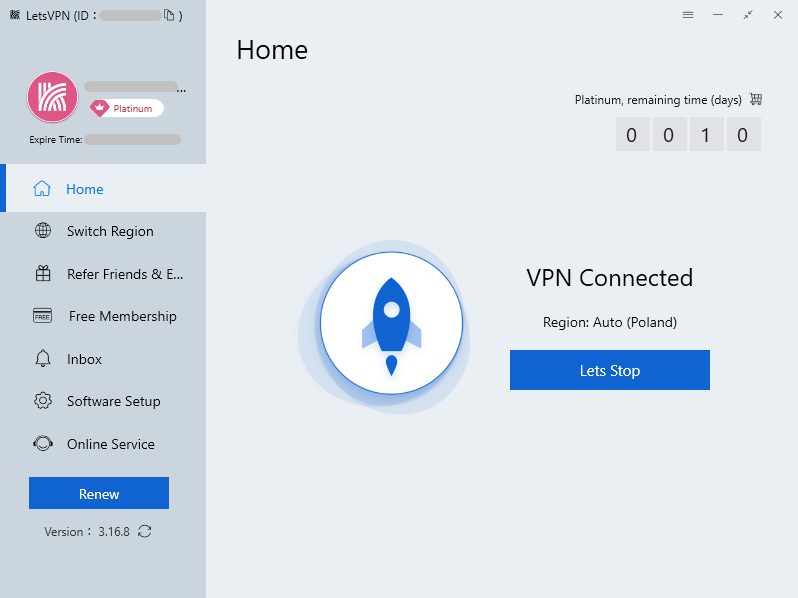
The app is simple. You get a list of servers and a button to connect to them. That’s all. No graphs showing server load, speed, or other fancy statistics. It’s like a Nokia 3310 for VPNs: very simple, but it works when you need it to.
Bizarrely, LetsVPN tends to default auto-connections to either Poland or Hong Kong. Most VPNs will pick the nearest physical location to you for automatic connections, but LetsVPN is a little more adventurous. It’s best to manually choose a server from the “Switch Region” menu if you have a specific location in mind.
How to Install LetsVPN
The entire installation process took me less than five minutes, including subscribing to a plan and getting the app ready on my PC.
- Visit letsvpn.world and click the download button for your platform.
- Run the installer (standard installation wizard, no tricks).
- Launch the app and create an account using an email address.
- Choose a subscription plan.
- Complete payment through the available options.
Installation is straightforward with no bloatware or sketchy bundled software.
How to Set Up LetsVPN
The setup process requires minimal technical knowledge, which is good because LetsVPN provides minimal documentation or support.
- Open the LetsVPN app and log in with your credentials.
- Select your connection mode (Full Speed or Full Mask) from the dropdown.
- Choose a server location from the list.
- Click the connect button and wait for the connection to establish.
Speeds & Performance Testing
The speeds of LetsVPN are usable but not very impressive. When I tested it, the VPN made my downloads noticeably slower than my normal connection. However, browsing, messaging, and standard streaming still worked fine. Upload speeds stayed pretty good, which helped keep things like video calls running smoothly.
The bigger issue was consistency. Servers that were close by worked fine, but connections to servers that were far away had very high latency and sometimes crashed. LetsVPN’s speeds are good enough for everyday browsing and getting around blocked sites, but they don’t compare to the speeds you get from most well-known VPN providers.
LetsVPN Speed Test Results
| Location: | Latency (ms) | Download (Mbps) | Upload (Mbps) |
|---|---|---|---|
| 🇬🇧 U.K.* | 12 | 277.1 | 29.1 |
| 🇬🇧 U.K.** | 21 | 33.3 | 26.2 |
| 🇩🇪 Germany | 31 | 27.3 | 23.2 |
| 🇭🇰 Hong Kong | 239 | 26.3 | 1.3 |
| 🇺🇸 United States | 488 | 22.9 | 24.8 |
| 🇦🇺 Australia | 331 | 19.5 | 19.8 |
**Fastest server
Streaming Performance
LetsVPN struggles with unblocking streaming services, which is kind of ironic for a service that’s supposed to help you access blocked content. Netflix actively blocks most LetsVPN servers, and the few that do work don’t always work well.
Can LetsVPN Unblock Netflix or Other Streaming Sites?
Netflix is a coin flip. Some VPN servers work, but most don’t. The ones that work this week might not work next week. I spent a lot of time hopping from one server to another to find one that Netflix wouldn’t flag right away, which defeats the whole point of “easy access to blocked content.”
| Streaming Service: | Status |
|---|---|
| Netflix | Partially Unblocked (inconsistent) |
| Amazon Prime Video | Blocked |
| HBO Max | Blocked |
| Hulu | Blocked |
| Disney Plus | Blocked |
| Paramount Plus | Blocked |
| BBC iPlayer | Partially Unblocked |
If streaming is a priority, literally any of the major VPNs (NordVPN, Surfshark, Proton VPN, ExpressVPN) will serve you better. LetsVPN is built for circumventing government censorship, not tricking streaming services.
Is LetsVPN Good for Torrenting?
LetsVPN’s privacy policy doesn’t say that torrenting is against the rules, but it also doesn’t say that it is. There is no mention of SOCKS5 proxies, port forwarding support, or servers that are optimized for P2P.
I tried downloading a legal torrent (the Ubuntu Linux installer) over a LetsVPN connection. It worked well, with speeds of about 8 MB/s on a server in the U.K. There were no disconnections during the download, and the connection stayed stable.
But I wouldn’t use LetsVPN for serious torrenting because it’s not clear how the company logs data, and it doesn’t support port forwarding. If you need a VPN just for P2P file sharing, look for one that clearly supports and works well with torrenting.
Security: Is LetsVPN Safe
LetsVPN is probably safe to use to get around firewalls, but you need to trust it more than open-source options because it uses its own protocols. And since LetsVPN doesn’t say anything about who owns it or how it works, that’s a lot of trust to ask for.
The company says that the service uses AES-256 encryption, but I can’t verify this. However, Google Play’s app security review confirmed that the app uses encrypted network communication. This keeps your traffic safe from threats from your ISP and your local network.
But what is “safe” depends on how you see the threat. Are journalists and activists safe from government spying? I wouldn’t risk my freedom on it.
Encryption & Protocols
LetsVPN doesn’t utilize standard VPN protocols such as WireGuard or OpenVPN. Instead, it uses proprietary connection methods that the company keeps confidential.
Evaluating the service from a security standpoint is challenging. While open-source protocols undergo extensive study and auditing, the implementation of LetsVPN cannot be independently assessed.
The company does not provide clear technical details regarding its encryption or tunneling methods. Some third-party reviews suggest that the service employs AES-256 encryption or traffic obfuscation to bypass detection on restricted networks. However, LetsVPN does not offer documentation to verify these claims.
The service seems to be designed to keep connections active on heavily filtered networks like those in China. Since the protocols are proprietary and not audited, users must rely on the assumption that the implementation is secure. It’s never a good idea to trust a service that isn’t independently audited.
Leak Test Results
I used dnsleaktest.com and ipleak.net to run DNS leak tests on several servers. There were no DNS leaks on any of the connections, and my real IP address stayed hidden the whole time.
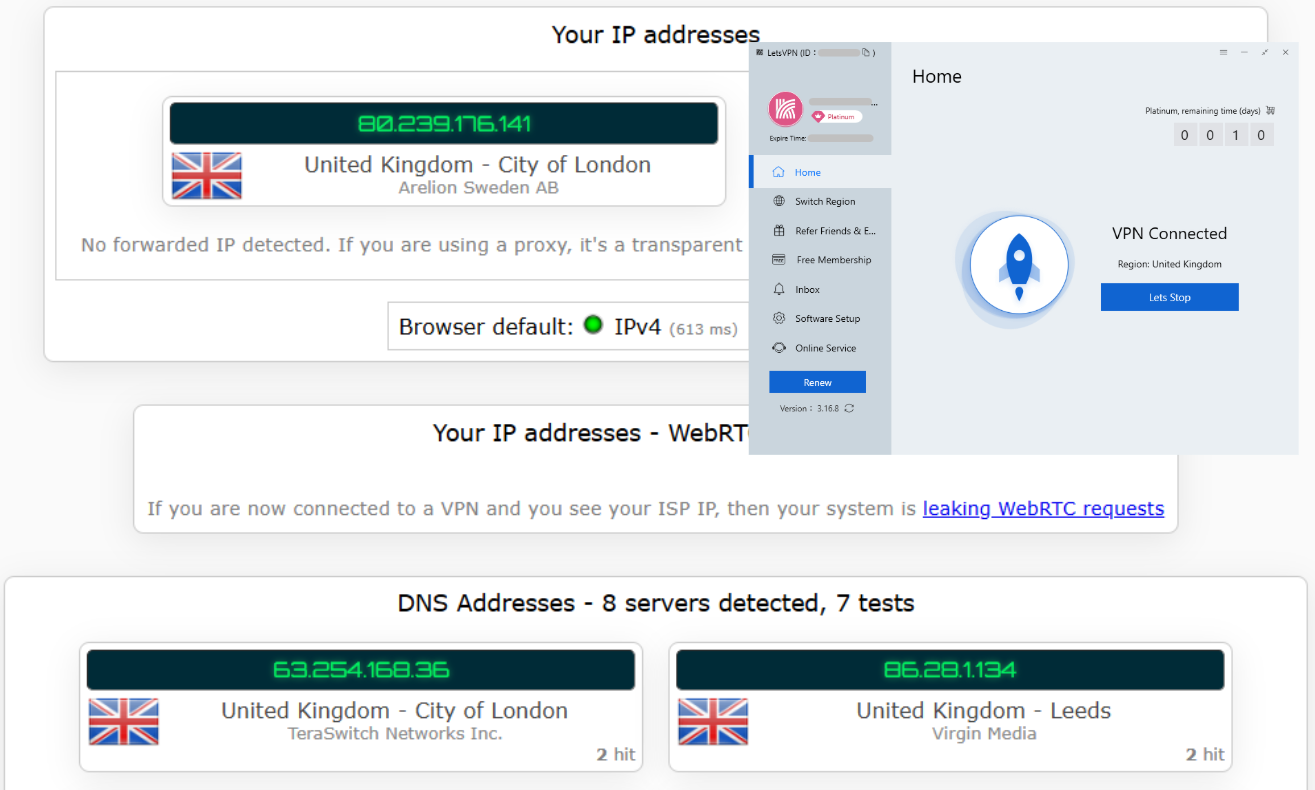
WebRTC leak protection worked in both Chrome and Firefox, just like it was supposed to. IPv6 traffic was blocked correctly; LetsVPN doesn’t support IPv6, so it kills IPv6 connections instead of risking leaks.
However, there’s no kill switch at all. When I force-closed LetsVPN and triggered connection disruptions with my WiFi, the encrypted connection vanished. There were no warnings or attempts to reconnect, leaving my data exposed and still in transit. If you’re somewhere like China, keep an eye on your connection to make sure it doesn’t drop and expose your data.
LetsVPN does what it says it will do when it comes to basic security. Your IP address is hidden, your traffic is encrypted, and leaks are stopped while you’re connected. The question is if you trust where that encrypted data is going.
Is LetsVPN Private?
I’m concerned about LetsVPN’s privacy because of its unclear logging policies and a lack of openness from the company. It seems like the person who wrote the privacy policy knew they needed one, but they didn’t really care about the privacy part itself.
Privacy Policy: Does LetsVPN Keep Logs?
LetsVPN claims to follow a “no-logs” policy, but the documentation offers little information on the specific data the service collects.
LetsVPN’s terms state that the company does not log user activity, including websites visited, DNS queries, or email traffic. The company states that it records access attempts to its servers solely for troubleshooting and enhancing service.
The policy offers scant details beyond that statement regarding the operational data that might be collected or the duration of its retention. The service lacks an independent audit to verify its logging claims, leaving users to depend solely on the provider’s statements.
Independent Audits
LetsVPN has not released any third-party security and privacy audits. Google’s security check for Android apps confirmed encryption but didn’t look at logging, data handling, or infrastructure security.
Deloitte, Cure53, and PwC, for example, audit NordVPN, Surfshark, and Proton VPN on a regular basis. Audits check for compliance with the no-logs policy and infrastructure security.
LetsVPN’s lack of independent verification is worrying because its target market is people who live in countries with strict privacy laws.
Customer Support
Support is useful but not always available, mostly through live chat and email. Don’t expect quick answers or help with technical problems. You also won’t find a thorough knowledge base for quick answers to common problems.
How to Contact LetsVPN
You can contact LetsVPN by live chat or email ticketing. I could not find any phone support or social media. The help center has some very basic setup guides and troubleshooting steps, but it doesn’t have any full documentation. If you have a technical problem, you’re mostly on your own.
I sent in a support ticket to ask about the company’s logging and jurisdiction. The answer took 18 hours and didn’t answer either question. Instead, it gave vague reassurances about privacy and security, which weren’t actually reassuring.
LetsVPN Reviews on Reddit & Social Media
Discussions on Reddit about LetsVPN tend to be mixed. Numerous users in travel and expat forums report that the service is dependable in mainland China, frequently recommending it for its ability to maintain a connection when other VPNs struggle.
Some users express concerns that the service does not provide clear information about its ownership, logging practices, and technical infrastructure. As a result, many commenters often mention that they would use LetsVPN for basic access to blocked apps like Gmail, WhatsApp or Instagram, but not for tasks that need robust privacy protections.
Many people said their accounts were suspended because of “abnormal behavior,” even though LetsVPN’s AI system flagged what looked like normal usage patterns. While one person was watching YouTube, another was banned for downloading a game from Steam. In both cases, support didn’t seem to help.
Several users said they were worried about LetsVPN’s unclear ownership and wondered if it might have ties to the Chinese government. I found no proof that these claims were true, and I also couldn’t definitively prove them wrong because LetsVPN isn’t transparent at all.
Does LetsVPN Work in China?
Yes, it is one of the most reliable and stable VPNs that you can use in China right now. This is LetsVPN’s main selling point, and it does a better job of delivering on that promise than almost any other company.
The trade-off for this reliability is the privacy and transparency issues I’ve talked about earlier. LetsVPN stands out for its reliability in China, unlike many other VPNs. However, the lack of transparency regarding its infrastructure makes it hard to pinpoint why the service remains effective there.
Bottom Line: Do I Recommend LetsVPN?
Yes, with some reservations. For travelers and expats in China who need reliable international internet access and aren’t doing anything politically sensitive, LetsVPN keeps its promise to get around the Great Firewall, and it does so at a competitive price.
For anyone concerned about privacy, engaged in journalism or activism, or looking for a general-purpose VPN: do not use LetsVPN. The lack of transparency, absence of independent audits, proprietary protocols, and vague privacy policy make this unsuitable for serious privacy protection. There are many good free VPNs that offer better privacy and security.
LetsVPN Alternatives
If LetsVPN’s privacy concerns worry you, here are three alternatives worth considering. If you’re traveling to China, make sure to download a few reputable VPNs beforehand, just in case one or two aren’t working.
Astrill VPN has been a go-to option for users in China for more than a decade and is widely considered one of the most reliable services during heavy censorship periods. It offers specialized protocols like StealthVPN designed to bypass deep packet inspection. Pricing starts at $30 per month, making it one of the most expensive consumer VPNs.


Surfshark is a full-featured VPN that bundles additional security tools like antivirus and identity monitoring in its higher-tier plans. It isn’t built specifically for China, but its Camouflage mode can sometimes bypass network restrictions. Surfshark allows unlimited simultaneous connections and starts at around $1.99 per month on long-term plans.
- Very good price-performance ratio
- High security level
- Netflix-compatible
- Unlimited simultaneous connections
- Great support with live chat
- No information on individual servers
- Can have issues establishing a connection


Mullvad VPN is a privacy-focused service known for transparency and strong security practices. It needs no email address to create an account and has undergone multiple independent security audits. Mullvad uses a flat pricing model of €5 per month, though it prioritizes privacy over censorship circumvention and isn’t designed specifically for China.
- No email address required to subscribe
- Speeds are highly consistent
- Has the cheapest monthly rate
- More privacy-focused features than most VPNs
- Split tunneling isn’t available on all OSes
- Few servers available outside Europe & North America
- Firefox only browser extensions
- Can’t get into all streaming services
FAQ: LetsVPN Review
Is LetsVPN free?
No, LetsVPN has no permanent free plan and doesn’t offer a typical free trial. However, Platinum plans start at $2.99 for a week of connection time.Is LetsVPN owned by China?
We don’t know. LetsVPN doesn’t share any public information about who owns the company, where it is based, or who is on the executive team.Is Surfshark better than LetsVPN?
Yes, for privacy and streaming. LetsVPN is more reliable in China, but Surfshark is more reliable overall.
Leave a Reply